
nanosphere modeling

A presentation on the modeling of regular mesoporous microspheres and core-shell structures.
Share this pageC4DModeling methods for two types of regular mesoporous microspheres and core-shell structures.C4DTo download, please seeDownload Cinema 4D 2024.5.0For commonly used plugins and basic settings, please seeInstalling Common Plugins和White Transparent Rendering Settings。

This resource is shared for personal study only; please do not use it for any commercial purposes. Thank you!
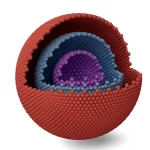
core-shell structure
Video Tutorials
Illustrated Tutorial
- Create a sphere, set the number of segments to 32, and do not adjust the radius.

- Convert the sphere to an editable object. The shortcut is
CKey.

- Switch to face mode to delete faces as needed; in this example, 1/8 of the sphere has been deleted.


To delete a portion, in the options,
Visible OnlyYou need to check this box. When selecting a face with the Rectangular Selection tool, hold downshift和CtrlThese keys add to and subtract from the selection on the currently selected face, respectively!

- Create a cloth surface for the sphere with a thickness of 15, for example.

- Create a new sphere as the core and add segments; a radius of about 60 should suffice.

- Rendering settings. Please refer toWhite Transparent Rendering Settings。

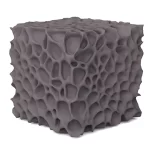
Regular Mesoporous Structures—Part 1
Video Tutorials
Illustrated Tutorial
- Create a sphere, set the number of segments to 32, and do not adjust the radius.

- Convert the sphere to an editable object. The shortcut is
CKey. Create a cloth surface for the sphere; use a thickness of 15 as an example.

- Create a new sphere to serve as the object for cloning the cylinder.

The type of sphere is an icosahedron!
- Create a new cylinder for cloning. Radius 9, height 132. Apply the Clone command to the cylinder.


- Set the clone mode to
Object, with the distribution pattern beingVertex, transformationRotate PAdjust the angle to 90°.


- Add
BooleanCommand.

Fabric surfaces go on top, clones go on the bottom!
- Slightly adjusting the number of segments on the sphere to 20 will increase the density of the holes.

- Rendering settings. Please refer toWhite Transparent Rendering Settings。

Regular Mesoporous Structures II
Video Tutorials
Illustrated Tutorial
- Create a sphere and convert it to an editable object. In Face Mode, delete 1/8 of it. Add a fabric surface with a thickness of 15.

- Create a new sphere to serve as the object to be cloned from the cylinder. Radius: 60; number of segments: 20.

- Create a new cylinder for cloning. Radius 9, height 132. Apply the Clone command to the cylinder.

- Add a clone command to the cylinder. Set the clone mode to
Object, with the distribution pattern beingVertex, transformationRotate PAdjust the angle to 90°.

- Add
BooleanCommand: Place the fabric surface on top and the clone on the bottom!

- Rendering settings. Please refer toWhite Transparent Rendering Settings。

Scan the QR code to follow the "Scientific Illustration 3D" WeChat official account for more shared resources.
After following, I will share more scientific research software and materials, continuously updating. Thank you!