Ruff Practical Tutorial

Ruff 0.17.6 Practical Tutorial: Unification Python Research CodeChecking, formatting, and Notebook specifications
Python scripts in research projects are often accumulated gradually by different stages and different people: duplicate import statements, misspelled variables, inconsistent code formatting, and notebooks may also contain temporary output and unnecessary cells. Ruff combines Python linting checks with...Code FormattingIt can be integrated into a quick tool to handle... Jupyter NotebookThis article takes Ruff 0.17.6 (Released 2026-11-19) Based on this, the demonstration shows how to install Ruff and establish [something] in a research project. pyproject.toml The basic workflow includes configuring, checking, and repairing scripts, formatting the Notebook, and automating checks before committing code.
What problem does Ruff solve?
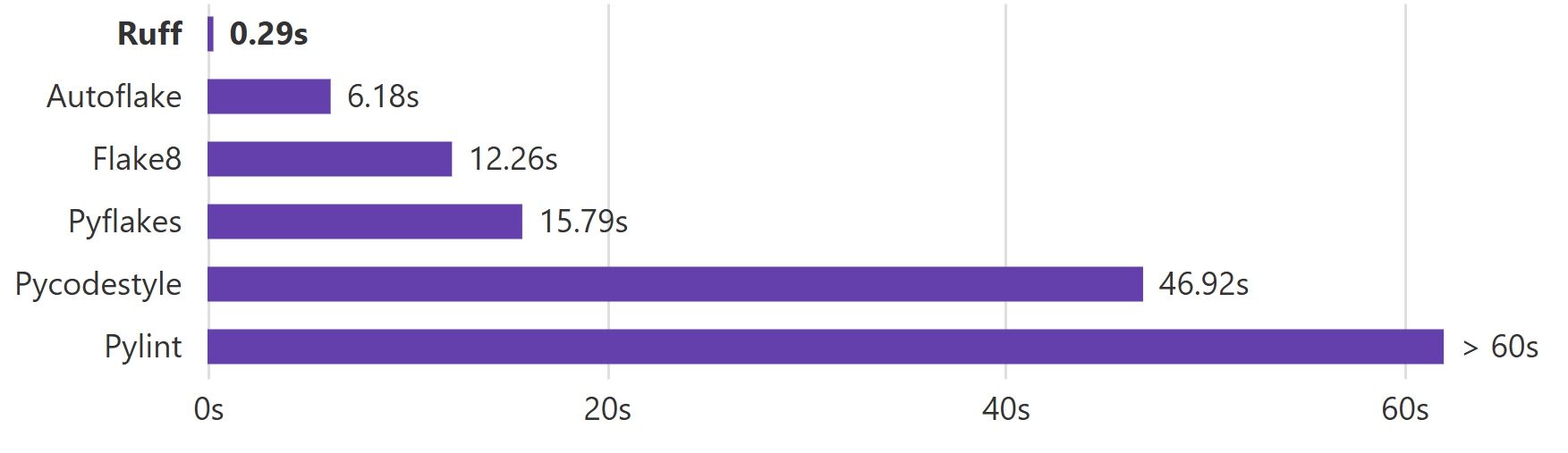
Ruff It's a Python lint and formatting tool written in Rust. It can check for unused imports, some common errors, and code style issues, and also standardize code layout. Officially, it's positioned as one of a toolchain that can replace various Python lint, import sorting, and formatting tools.
In research projects, Ruff is particularly well-suited for handling these everyday problems:
- The script imports the module but does not use it;
- The variable name is misspelled, or there are some issues that can be detected by static analysis;
- The styles of spaces, indentation, quotation marks, and line breaks are inconsistent across different experimental scripts;
- There are issues with import order and unused variables in the Notebook code cells;
- Collaborators want to use the same set of rules to check the project before submitting code.
It needs to be clarified that:Ruff is not a scientific computing correctness verifier, nor is it a complete type checker or testing framework. It cannot replace unit testing, numerical result verification, code review, and experimental documentation. Its value lies in reducing some low-level code maintenance costs, making it easier for researchers to identify common problems and keep the code clean.
Install Ruff 0.17.6
Ruff can be used UV、pip、pipx Alternatively, you can install it using the official standalone installer. The following describes two common methods used in research projects.
Method 1: Install to the current project (Recommended)
If the project has already used UV Manage dependencies by running the following command in the project directory:
uv add --dev ruff==0.17.6In this way, Ruff will be written as a development dependency into the project configuration, and the parsing results will be recorded in the lock file. After team members synchronize the project, they can use the same version in the project environment.
If the project uses a regular Python virtual environment, you can activate the environment first, and then install it:
python -m pip install ruff==0.17.6Check version:
ruff --versionIt should display Ruff 0.17.6. If the command cannot be found, first confirm the Python environment used by the current terminal and whether the Scripts/bin directory of that environment is in the PATH.
Method 2: Install independently using UV Tool
If you want to use the same Ruff command in multiple projects without installing it into a specific project environment, you can use:
Install uv tool ruff==0.17.6Standalone tools are suitable for routine checks on personal computers; project-level development dependencies are better suited for team collaboration and locking tool versions. Choose one of the two methods; there's no need for duplicate installations.
Establish a unified configuration in scientific research projects
It is recommended to create or edit in the project root directory. pyproject.tomlIf this file already exists in the project, do not overwrite the existing one. [project]For dependencies or build configurations, simply merge the corresponding configuration section for Ruff.
Here is a basic configuration suitable for those new to Ruff:
[tool.ruff] line-length = 88 # Specifies the minimum Python version supported by the project to avoid dependency tools. Default value: target-version = "py310"[tool.ruff.lint] # First use the default rules, then gradually expand select = ["E", "F"] select = ["E", "F"][tool.ruff.format] quote-style = "double" indent-style = "space"Note:target-version Do not add extra spaces before the heading. The correct way to write it is:
target-version = "py310"The example here uses Python 3.10 to illustrate how to explicitly declare the minimum version for your project; if your project actually supports Python 3.11, 3.12, or higher, you should specify the minimum version for your project. requires-python And operating environment adjustments.
Starting with Ruff 0.17.0, without configuration... target-version 或 project.requires-python When upgrading Ruff, the default target version changes from Python 3.10 to 3.11. Therefore, older projects should explicitly specify the minimum supported version to avoid unexpected changes in the checking behavior after upgrading Ruff.
Why enable only E and F first?
E: Some code style and formatting issues in pycodestyle;F: Pyflakes checks, such as unused imports and some common code errors.
Starting with a small number of rules can prevent too many historical issues from arising during the first run. Once the team is familiar with the process, then we can consider adding more rules. I(Import sorting)B(bugbear)UP(pyupgrade) and other rule groups. Do not enable them from the beginning. ALLThis is because new rules may be automatically incorporated when Ruff is upgraded, which may cause changes in the inspection results.
Checking scientific research Python scripts
Open a terminal in the project root directory and run:
Ruff check.Ruff recursively checks for recognizable Python files in the current directory, following configuration and common ignore rules.
If you only need to check a specific script:
ruff check scripts/analyze_data.pyCheck the diagnostics first, don't rush to use automatic repair.
On the first run, it is recommended to read the output. Each diagnostic typically provides the file, row and column position, rule code, and a brief description. For research code, first determine whether it is a pure formatting issue, a useless import, or a modification suggestion that may affect the runtime logic.
Automatic repair of problems that can be safely handled
Ruff check. --fix--fix We will attempt to fix the lint issues that support automatic fixing. It is recommended to first create a commit or check using Git. git diffThen run the automatic repair. Automatic repair does not automatically prove that the code is correct, especially when it involves variables, imports, and control flow. You should review the changes and run project tests.
View only repairable suggestions
ruff check . --fix --diffYou can review the differences first before deciding whether to apply them. For important research scripts, it is recommended to follow the sequence of “check—review—fix—test” rather than performing batch modifications directly on the entire historical codebase.
Unified code format
Ruff formatter can be used to standardize indentation, line breaks, spaces, and code layout in Python files. Its goal is similar to Black's, focusing on providing consistent formatting rather than redesigning code style.
Format the current project
ruff format.This command will directly modify files within the specified range. It is recommended to commit your current work or confirm before execution. git status There are no major changes that have not yet been saved.
Check only the format, do not modify the file.
ruff format --check.If the file does not yet meet the format requirements, the command will return a non-zero exit status. This mode is suitable for use before continuous integration or committing.
Check format differences
ruff format --diff.Checking for differences before formatting is a more reliable approach for existing research projects.
Note: Ruff formatter and lint are two independent functions. You can use only one. ruff formatAlternatively, you can just run... ruff checkWhether to use them simultaneously depends on the project's specifications.
Directly inspect Jupyter Notebook
Ruff supports .ipynb File linting and formatting. For versions 0.6.0 and later, Notebook has included file discovery by default.
Assuming the project includes:
research-project/ ├── pyproject.toml ├── scripts/ │ └── analyze.py └── notebooks/ ├── 01-exploration.ipynb └── 02-model-fit.ipynbCheck Notebook:
ruff check notebooks/Format check:
ruff format --check notebooks/If you only want to perform linting on the Notebook and prevent it from being automatically formatted, you can exclude formatting in the configuration:
[tool.ruff.format] exclude = ["*.ipynb"]Conversely, if you only want to format the Notebooks and not perform linting on them, you can... [tool.ruff.lint] Set the corresponding excludeSpecific rules and behaviors may differ from ordinary ones. .py Different files may have different import locations; for example, some import location checks will be processed at the Notebook cell level.
Notebook formatting may change the layout of cell code, but it won't help you judge the reasonableness of your experimental results. You shouldn't mistake cleaning up output, deleting cells, or changing the execution order for formatting. It's best to make a copy or commit to version control before running the program, especially for notebooks containing important charts, long-term calculation results, and experimental parameters.
Add Ruff to Git pre-commit checks
If you are already using Git to manage your research code, you can run Ruff automatically before committing. First, install it in your project environment:
python -m pip install pre-commitCreate in the project root directory .pre-commit-config.yaml:
repos: - repo: https://github.com/astral-sh/ruff-pre-commit rev: v0.17.6 hooks: - id: ruff-check args: [--fix] - id: ruff-formatInstall Git hook:
pre-commit installManually run all checks:
pre-commit run --all-filesUpon submission, the pre-commit process will run checks according to the configuration. If the hook modifies the file, it needs to be reviewed and submitted again. For team collaboration, it is recommended to... .pre-commit-config.yaml 和 pyproject.toml This is all incorporated into version control, ensuring all members use the same rules and tool versions. The official Ruff tutorial provides... ruff-check 和 ruff-format Example of pre-commit configuration.
Recommended order for checking the quality of scientific research code
Ruff is best placed in the first half of the research code maintenance process. A simple and easy-to-maintain order is:
- Save the code and check the Git status;
- run
Ruff check.; - View diagnostics and address fixable issues;
- run
ruff format --check.; - Run unit tests or small-scale verifications on important scripts;
- Check that the output files, charts, and key values still meet expectations;
- Submit the code or record the experimental version.
Ruff can help unify code and discover some static issues, but it cannot replace scientific verification. For randomized algorithms, numerical simulations, image analysis, and machine learning workflows, the random seed, data version, parameters, dependencies, and result verification methods should still be documented.
Frequently Asked Questions
Does Ruff require Rust to be installed?
Normally not. When installing via PyPI, uv, pipx, or the official installer, a pre-built version is used. [6]
Can Ruff completely replace Black and Flake8?
It covers many common linting and formatting needs, but whether it can replace existing tools depends on the rules, plugins, and specific configurations enabled in the project. Before migrating, you should compare it with the original rules and not judge complete equivalence based solely on the tool name.
Why does Ruff encounter an import location problem when checking a Notebook?
The Notebook's code is distributed across multiple cells, and some rules are processed according to cell semantics. You can view the specific rule descriptions and adjust them as needed. *.ipynb Configure per-file-ignores instead of disabling the rule globally.
What if the results change after automatic repair?
Check the Git diff to confirm that the changes only affect the intended code; then run tests and small-scale validation. For research scripts, it is recommended to retain the original data and result files to avoid mixing formatting and experimental result updates in the same change.
Conclusion
Ruff cannot determine the scientific validity of code for researchers, but it can automate repetitive, low-level code maintenance tasks. For personal projects, start with... ruff check 和 ruff format --check Establish a minimal inspection process; for team projects, incorporate configurations, tool versions, and pre-commit hooks into version control. Making the standards simple, stable, and easy to implement is more conducive to long-term maintenance of research code than implementing all rules at once.
Reference Links
- Ruff 0.17.6 Official Release (2026-11-19):https://github.com/astral-sh/ruff/releases/tag/0.17.6
- Ruff Official Tutorial:https://docs.astral.sh/ruff/tutorial/
- Ruff Linter documentation:https://docs.astral.sh/ruff/linter/
- Ruff Formatter documentation:https://docs.astral.sh/ruff/formatter/
- Ruff Configuration Documentation:https://docs.astral.sh/ruff/configuration/
- Ruff Jupyter Notebook Configuration Instructions:https://docs.astral.sh/ruff/configuration/#jupyter-notebooks
- Ruff pre-commit integration:https://docs.astral.sh/ruff/tutorial/#integrations
- Ruff Official FAQ:https://docs.astral.sh/ruff/faq/
- PyPI Ruff 0.17.6:https://pypi.org/project/ruff/0.17.6/
- PyPI Stats Ruff:https://pypistats.org/packages/ruff