Table of contents
Hide
LaTeX: A Powerful Tool for Formatting Scientific Papers

LaTeX ResearchThesis FormattingPractical Tutorial: Writing a Thesis, Editing Formulas, and Referencing from ScratchLiterature Management
In STEM fields, including computer science, mathematics, physics, and some life sciences, LaTeX is a common typesetting tool for scientific research papers and academic publications. Unlike traditional word processing software, LaTeX organizes document content through structured commands, managing text, mathematical formulas, images, tables, references, and layout settings separately. This makes paper formatting more standardized and facilitates long-term revisions and collaborative work among multiple people. This article, starting from practical scientific research writing needs, introduces the basic principles of LaTeX, editing environment configuration, paper structure building, mathematical formula editing, image and table insertion, reference management, and common error handling. It also provides a directly compileable paper template to help beginners establish a complete LaTeX paper writing workflow.
LaTeX is needed for writing scientific research papers.
In scientific research, paper writing involves not only textual content but also mathematical formulas, figures, numbers, citations, and complex chapter structures. As papers increase in length, manually adjusting the format can easily lead to a series of problems:
- After the chapters are revised, the table of contents and numbering need to be checked again.
- After inserting or deleting an image, the chart numbering may need to be adjusted.
- When there are many formulas, numbering, alignment, and referencing can easily become confusing.
- With the increase in the number of references, maintaining citation formats and end-of-article lists has become cumbersome.
- Different journals and conferences have different formatting guidelines, and converting paper formats requires additional time.
LaTeX's design philosophy differs from traditional WYSIWYG editors. Authors primarily write structured text and formatting commands, which are then compiled by the TeX engine to generate PDF files. Titles, chapters, formulas, images, tables, and references are automatically processed according to uniform rules.
What is LaTeX?
LaTeX is a document preparation system built on top of the TeX typesetting system. It is not an ordinary text editor, but a set of tools that use commands and environments to describe document structure, content, and formatting rules.
For example, in a regular text editor, an author might need to manually adjust the position, font size, and numbering of formulas; in LaTeX, formulas can be described using a mathematical environment, and the typesetting system will handle the corresponding formatting.
LaTeX is particularly well-suited for the following tasks:
| Application scenarios | The main advantages of LaTeX |
|---|---|
| Research papers | Unified management of chapters, charts, formulas and references |
| Mathematical and Physical Research | Convenient for inputting complex mathematical expressions |
| Computer Science Papers | Supports algorithm, code, and complex table formatting |
| dissertation | To facilitate the use of the essay templates provided by the school |
| Academic conference submissions | You can use the official template provided by the conference. |
| Technical Report | Supports directory, cross-references, and multi-file management. |
It's important to note that LaTeX is not the only option for all academic writing scenarios. If the target journal provides a Word template, or if the research team primarily collaborates using Word, you can still choose the appropriate tool based on your specific requirements.
Differences between LaTeX and Word
The biggest difference between the two lies in the document organization and formatting methods.
| Comparison items | LaTeX | Microsoft Word |
|---|---|---|
| Editing method | Documentation via commands and text descriptions | What you see is what you get |
| Mathematical formula | Native support for complex mathematical typesetting | Supports formula editor |
| References | It can be integrated with BibTeX and BibLaTeX for management. | Often use document management software |
| Chart Number | Automatic numbering and cross-referencing | Supports captions and cross-references |
| Complex Papers | Suitable for long, structured documents | Suitable for intuitive editing and modification |
| Template system | Abundant academic journal and conference templates | Depends on a specific Word template |
| Learning cost | Familiarity with basic commands and compilation is required. | Relatively easy to get started |
| Collaboration methods | Collaboration can be achieved through code version management and online platforms. | Collaboration is possible through cloud documents and revision features. |
For papers with many formulas, complex structures, or those that need to strictly follow academic publishing templates, LaTeX usually offers good controllability.
Typical applications of LaTeX in scientific research
How to choose a LaTeX editing environment?
Before you start writing, you need to decide which editing environment to use.
For beginners, there are generally two approaches: using an online editing platform or installing a LaTeX environment on a local computer.
Online editing: Overleaf
Overleaf It is currently a relatively common online LaTeX editing platform. It integrates code editing, document compilation, and PDF preview into a webpage, eliminating the need for users to configure a complete TeX distribution themselves.
Official website:
Key features of Overleaf:
- No need to install a complete LaTeX environment locally.
- Documents can be edited and compiled in a browser.
- Supports collaborative editing by multiple users.
- You can use existing paper templates.
- Supports the management of images, references, and multiple source files.
- You can directly view the compiled PDF.
Operating steps:
- Visit the official Overleaf website.
- Register and log in to your account.
- Click New Project.
- Select Blank Project to create a blank project.
- Enter the project name, for example
Research_Paper。 - Enter the editing interface and modify the text in the left-hand editing area.
main.tex。 - Click Recompile and wait for the PDF preview to be generated on the right.
If this is your first time using LaTeX, it's recommended to use Overleaf to familiarize yourself with the basic syntax. It saves you the trouble of configuring your local environment and installing a compiler.
Local editing: TeX Live + TeXstudio
If you wish to complete your thesis writing on your local computer, you can use TeX Live and TeXstudio to set up an editing environment.
This approach is more suitable for researchers who need to write long-term, manage multiple paper projects, or want to include paper source files in Git version control.
Step 1: Install TeX Live
TeX Live is a complete TeX and LaTeX software distribution that includes commonly used typesetting programs, packages, and font-related components.
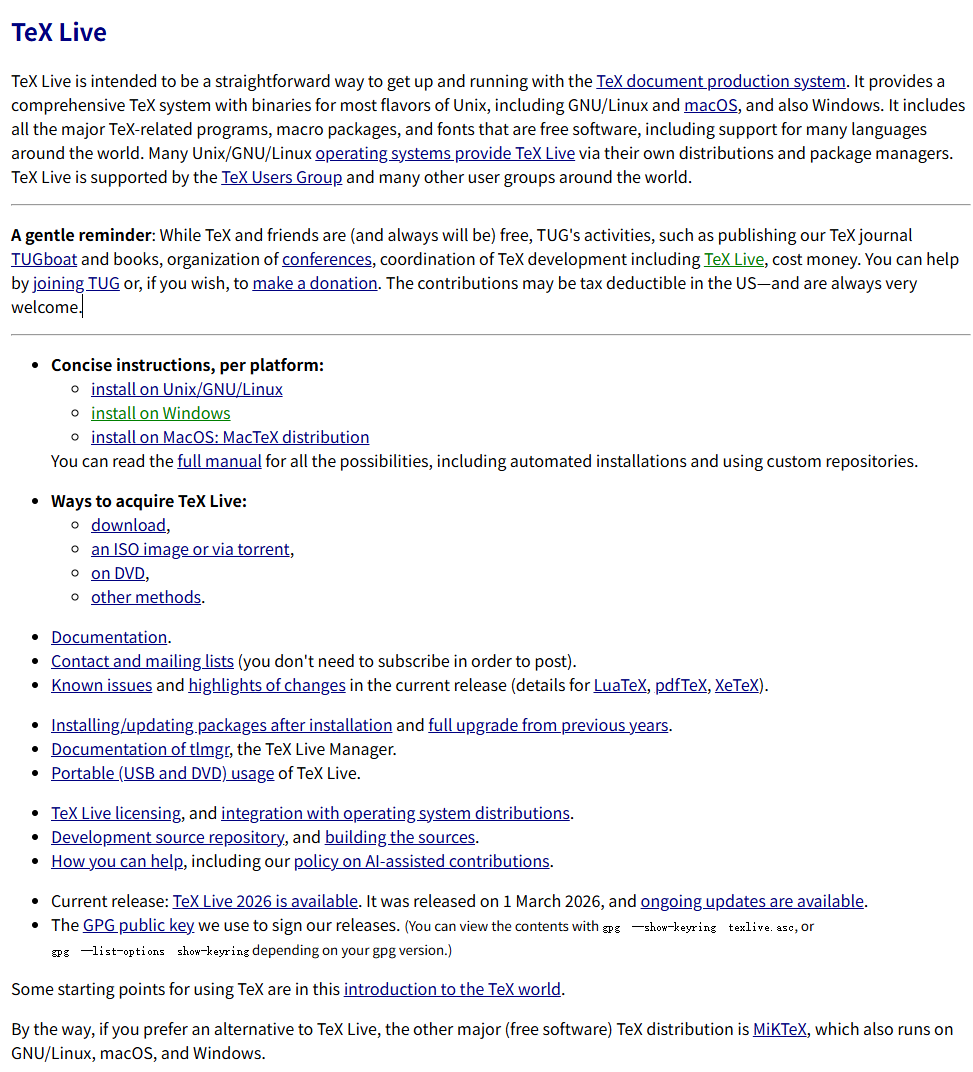
Official website:
Windows usersDownload the official installerFollow the installation wizard to complete the configuration.
After downloading the installation package, click to install. If a Microsoft Defender SmartScreen error message appears and blocks the installer, you can still run it.
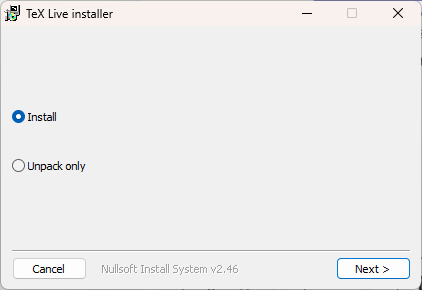
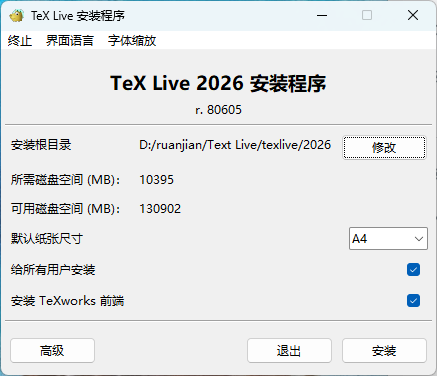
Click Install to begin the installation.
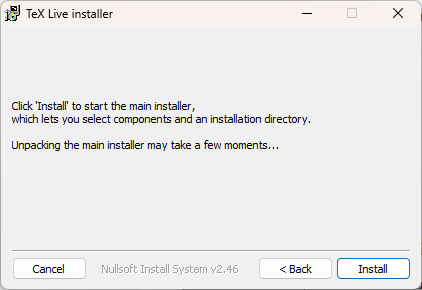
It is recommended to change the installation root directory to a location other than C drive before clicking install. The example version is the latest r.80605 version before the publication of this article in 2026.
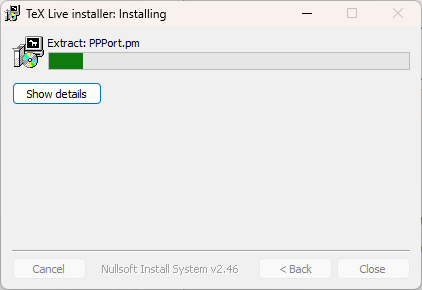
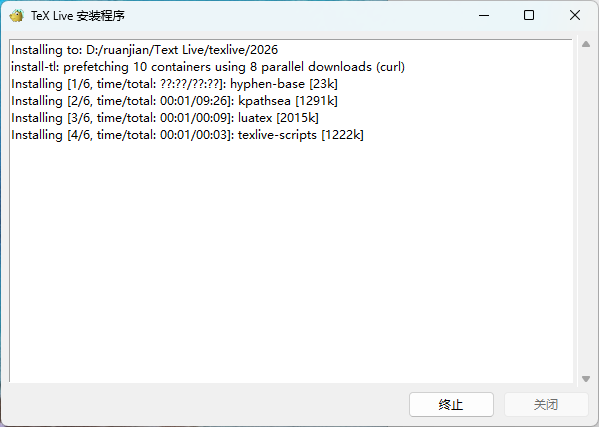
Waiting for installation.
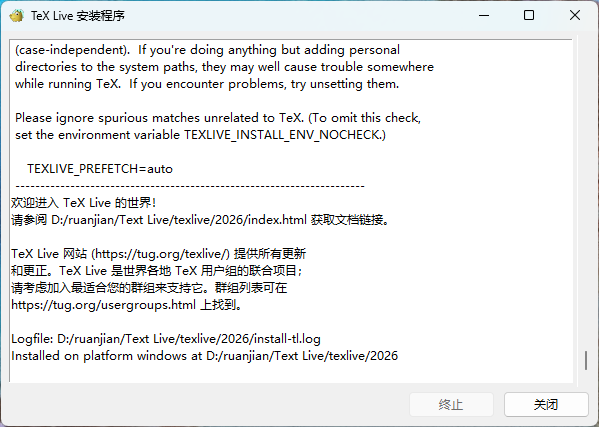
After waiting for a while, the installation will be complete.
After installation, you can find the TeXworks editor on the start screen.

After installing TeX Live, you need to confirm whether your system can invoke it from the command line.
Win + RKey, inputcmdPress Enter and typexelatex --version。
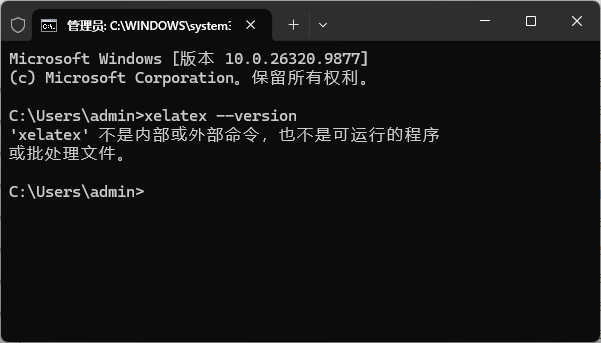
If prompt “Not an internal or external command”This usually means that although TeX Live is installed, the path to its executable file has not been added to the system's environment variables. PATH In the middle, it needs to be added manually.
- Press
WinKey, input “Environmental variables”Click in the search results “Edit system environment variables”。 - In the pop-up “System Properties” window, click the bottom right corner. “Environmental variables” Button.
- Below“System variables”Area, find and select"
PathVariables, then click “edit”。 - Click “New”Then TeX Live
binPaste the full directory path. This installation directory is for reference.The installation directory of TeX Live mentioned above,turn upbinThe directoryWindowsDirectory. The example path is:D:\ruanjian\Tex Live\texlive\2026\bin\windows
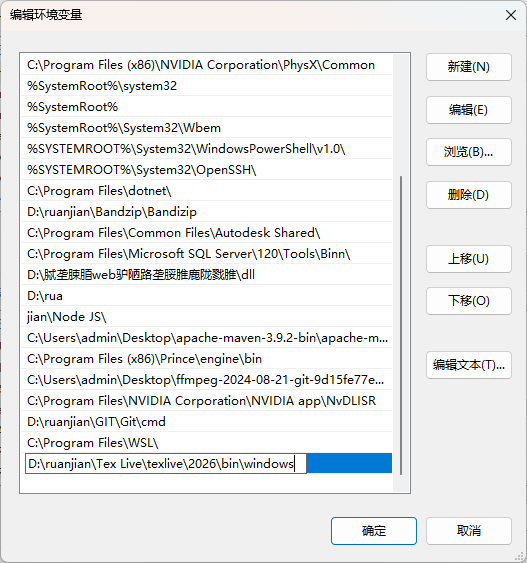
Configure the system environment variable PATH, reopen the command line to verify the installation. The returned version information typically includes TeX Live and the year in the first line, such as TeX 3.141592653 (TeX Live 2026). This indicates that TeX Live was installed successfully.
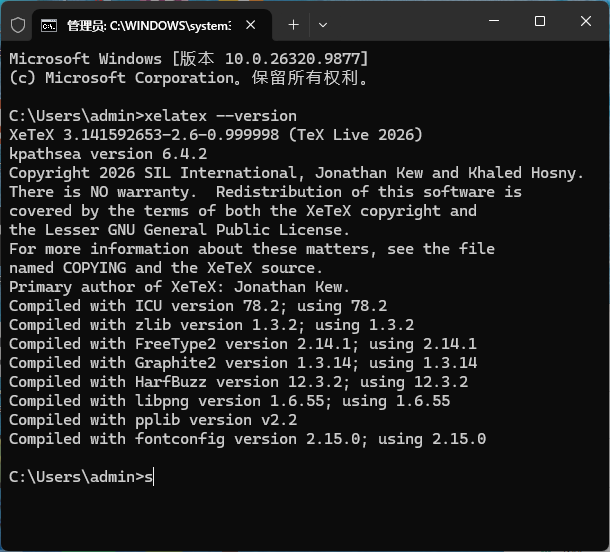
After successful installation of TeXworks editor, you can edit and use LaTeX to type documents locally. TeXstudio is an editor that can improve the speed of document typesetting; it is optional.
Step 2: Install TeXstudio (Optional)
TeXstudio is an integrated writing environment for creating LaTeX documents and supporting the editing and compilation of LaTeX projects.
Official website:
As of the time of this article's publication, the latest version is...TeXstudio 4.9.9Choose the correct installation package based on your system.
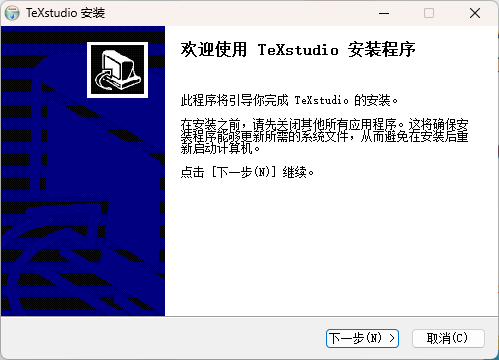
Click Next, change the installation directory (it is recommended to set it outside of the C drive), and then click Install.
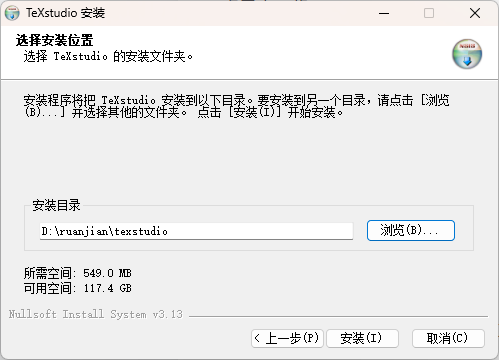
Start the installation.
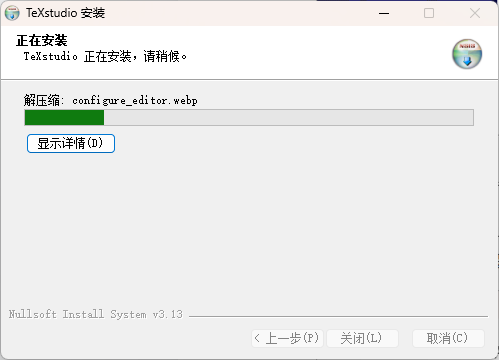
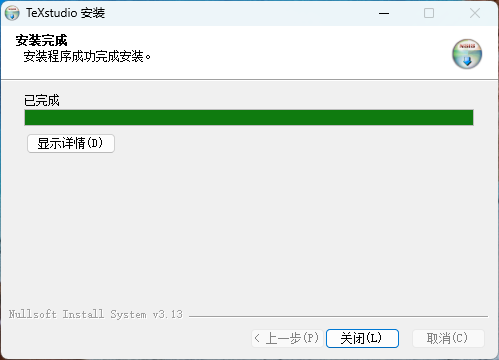
TeXstudio installation complete.
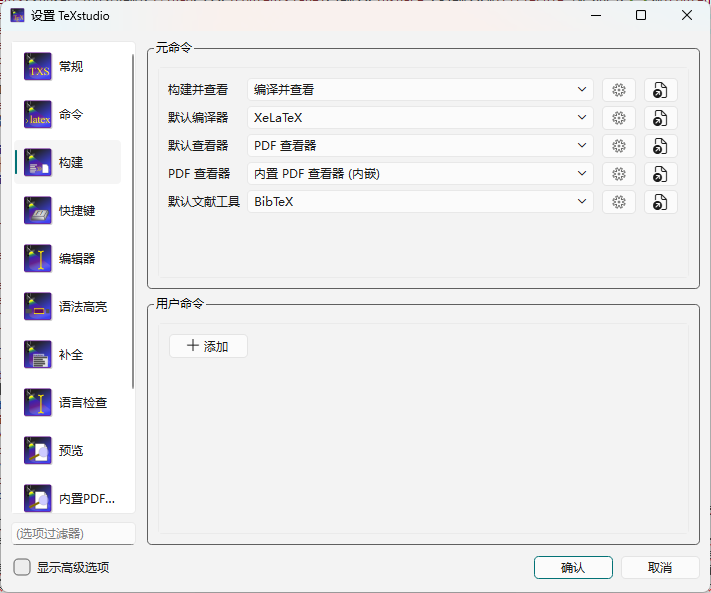
TeXstudio configuration:
After installing TeXstudio, open Options → Settings → Build, and change the default compiler to XeLaTeX.
Open Options → Settings → TeXstudio → Commands, and confirm that the compilation directory is entered correctly.After verifying successful installationThe command directory in TeXstudio is automatically filled in and does not need to be changed. If the command line is empty or displayed in red, you need to add the system variable again. After restarting, TeXstudio will automatically recognize it.
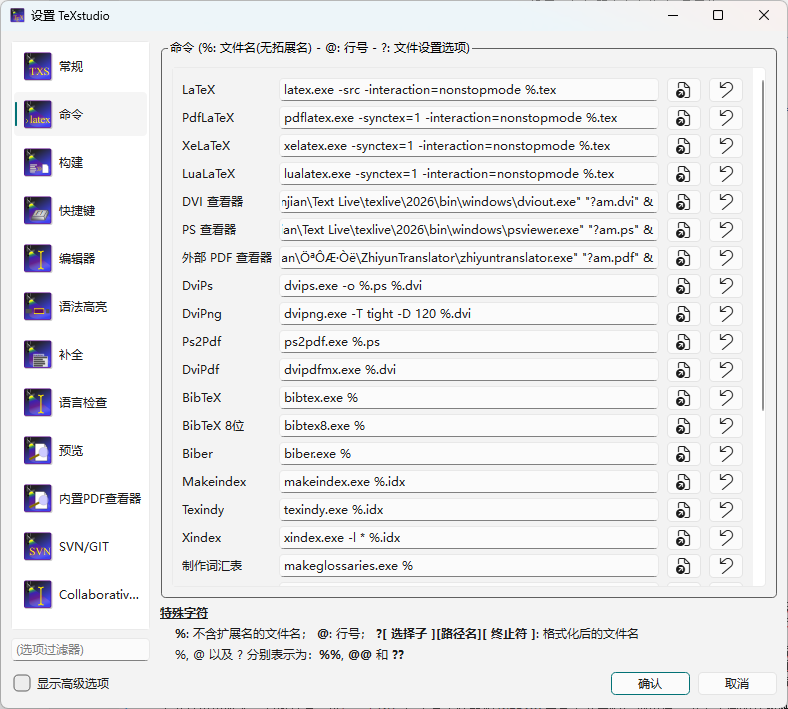
Step 3: Configure the compilation method
Common LaTeX compilation engines include:
| Compilation Engine | Features | Common use cases |
|---|---|---|
| pdfLaTeX | Traditional and mature | English papers, traditional templates |
| XeLaTeX | Supports system fonts and Unicode | Chinese papers, mixed Chinese and English text |
| LuaLaTeX | Supports modern fonts and Lua extensions | Complex typesetting and modern LaTeX projects |
Papers containing Chinese content are generally given priority consideration. XeLaTeXFor English journal templates, the compiler engine specified in the template instructions should be used.
Note that after installing TeX Live, some packages may require additional updates. If you encounter missing packages during compilation, check your current distribution and package manager before deciding whether to install the missing components.
How to choose between the two options?
If you're just learning LaTeX or writing a course paper, Overleaf is usually sufficient.
If you need to maintain paper source files long-term, handle large projects, or run compilation tasks locally, you can consider TeX Live + TeXstudio.
The two methods are not mutually exclusive. You can also complete the initial draft in Overleaf first, and then download the project source files as needed to continue making modifications locally.
LaTeX Template Recommendations
In my opinion, LaTeX is the best typesetting tool for writing academic papers. Compared to Word, LaTeX has significant advantages in layout, formula and image formatting, and citation insertion. However, LaTeX has extremely strict syntax commands, making it difficult to learn; sometimes even missing a single symbol can lead to a compilation error.
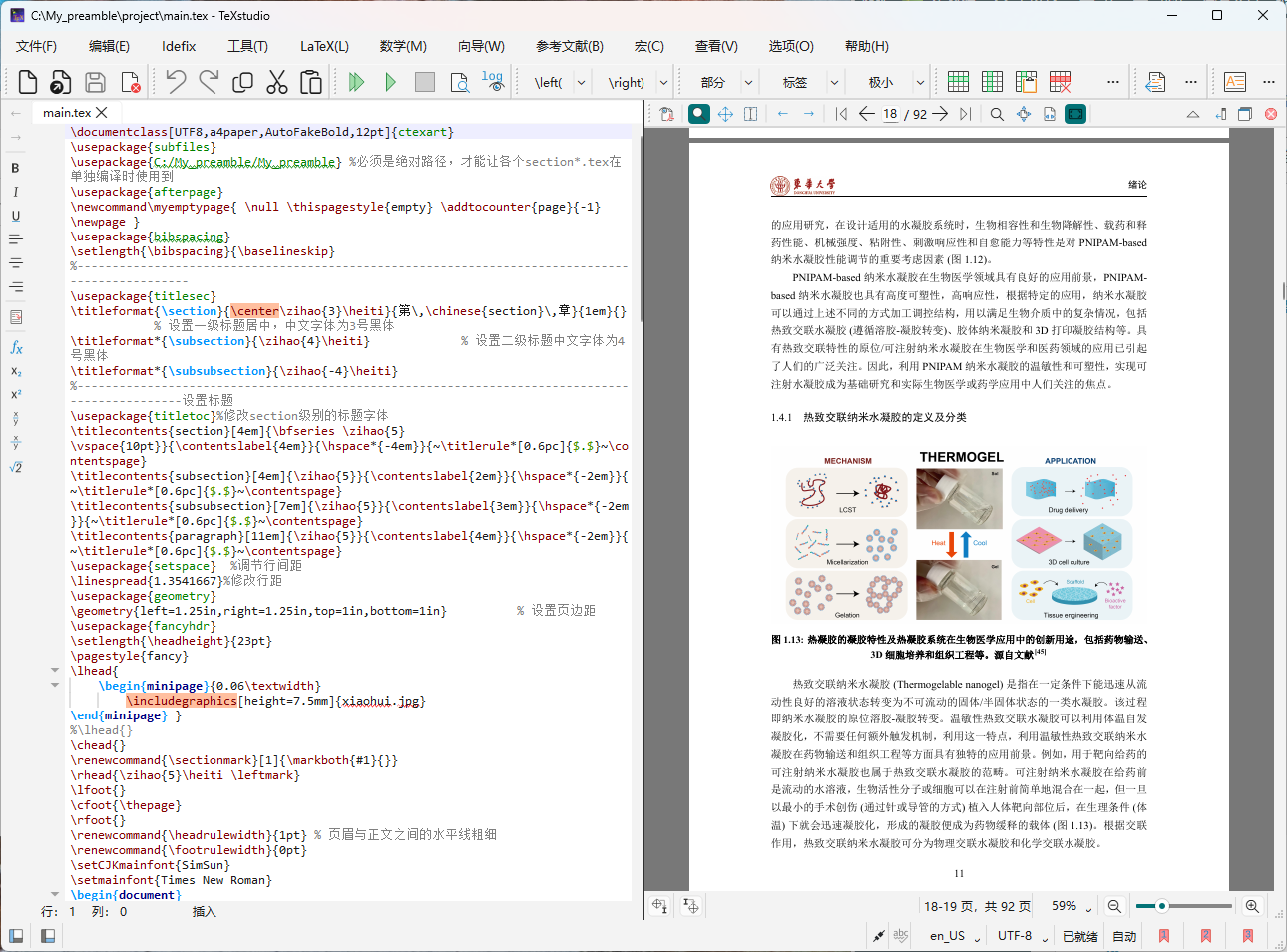
Based on this, I'd like to share a LaTeX template from my graduate thesis. This template is based on...Standardized Requirements for the Format of Graduate Theses at Donghua University和Academic Master's Thesis TemplateIt has been revised and optimized to meet the basic requirements and format of domestic academic papers.
Actual typesetting effect display
The complete paper obtained via LaTeX is as follows:
Template Features and Core Advantages
Professional and standardized Chinese academic typesetting
The template adopts a concise and rigorous academic document design style, and organizes page elements such as titles, body text, paragraphs, headers and page numbers in a unified manner.
The overall layout emphasizes reading rhythm and visual hierarchy, avoiding excessive decoration, so that the paper can maintain academic seriousness while also providing a good reading experience.
Whether it's the research background, experimental methods, or results analysis and discussion, everything can be presented within a unified formatting system.
Complete paper structure organization
The template references the common organizational format of Chinese dissertations and covers several important components:
- Chinese Abstract and Keywords
- English ABSTRACT and KEY WORDS
- Multi-level chapter directory
- Introduction and main text research chapters
- Summary and Outlook
- References
- Publications and academic achievements during degree studies
- Acknowledgments
Different components have relatively independent layout organization methods, which is conducive to building academic documents with clear logic and complete structure.
Clearly structured multi-level headings and table of contents
A thesis typically contains multiple research chapters, as well as numerous secondary, tertiary, and even more in-depth subsections.
The template uses a hierarchical heading organization, making the logical relationships between chapters more intuitive.
The table of contents uses dotted lines to connect titles with corresponding page numbers, clearly showing the paper's structure and helping readers quickly understand how the research content is organized.
For lengthy graduation theses, a clear table of contents structure is especially important.
Layout of figures and tables suitable for scientific research papers
Scientific papers often need to demonstrate a large number of experimental results and research processes, including:
- Experimental Procedure and Technical Roadmap
- Schematic diagram of material structure and molecular structure
- Microscopic images and morphological characterization images
- Infrared spectroscopy, nuclear magnetic resonance and other analytical graphs
- Experimental data and statistical results
- Research Mechanism and Theoretical Model Diagram
The scientific illustrations in the template are centered and include standardized figure numbers and caption areas, ensuring a clear correspondence between the graphic content and the text.
The tables adopt a concise academic style, suitable for displaying experimental reagents, instrument parameters, and other research data.
More suitable for typesetting complex formulas and technical symbols
LaTeX has a better typesetting advantage for research papers involving mathematical derivations, physical models, chemical expressions, and complex subscripts and superscripts.
Compared to traditional typesetting methods that rely heavily on manual adjustments, LaTeX can organize formulas and text through structured code, making it easier to maintain and modify.
It is especially suitable for researchers who frequently need to deal with formulas, variables, special symbols, and professional expressions.
Consistent header, footer and page layout
The consistency of pages in a long paper directly affects the overall reading experience.
The template features a unified design for headers, footers, page numbers, and body text. The top of the page uses chapter information and dividing lines to establish visual hierarchy, while the page number placement at the bottom remains consistent.
The preface and main text use different page numbering formats, making the distinction between different sections of the paper clearer.
This design allows for a coherent and uncluttered reading experience throughout the paper.
Target audience
This template is especially suitable for the following users:
- Master's students: This is a reference for the organization and formatting of graduation theses.
- Doctoral students: Used for formatting long dissertations and research documents.
- Undergraduate graduates: Used for learning LaTeX academic typesetting and creating graduation theses.
- University teachers and researchers: Used for formatting research reports, research materials, and academic documents.
- LaTeX beginners: Learn structured formatting methods for Chinese academic documents through real-world academic paper examples.
Template Acquisition
If you are preparing your graduation thesis, or want to learn how to use LaTeX to create standardized and professional Chinese academic documents, this template can serve as a practical starting point.
No need to start from a blank document; begin with established typesetting examples and gradually build your own academic paper typesetting environment.
Welcome to download and try this LaTeX template to make your paper formatting more standardized, clear, and efficient.

 Basic Member
 Intermediate member
 Premium member
Note: Specific formatting requirements for dissertations may vary by university, college, and discipline. Please check your institution's latest dissertation guidelines before use and adjust the formatting accordingly.
Template introduction and usage instructions
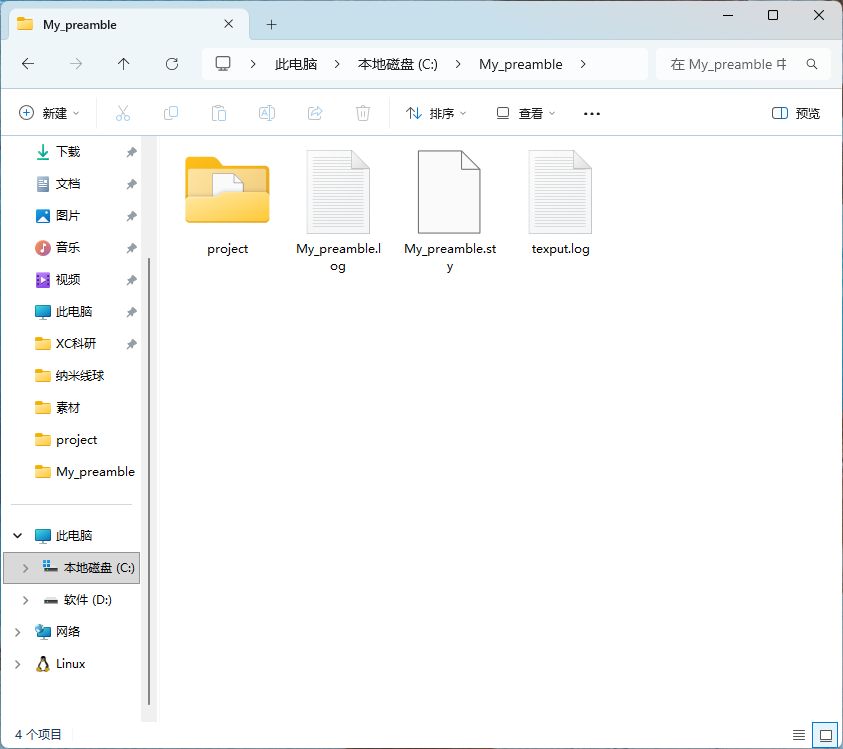
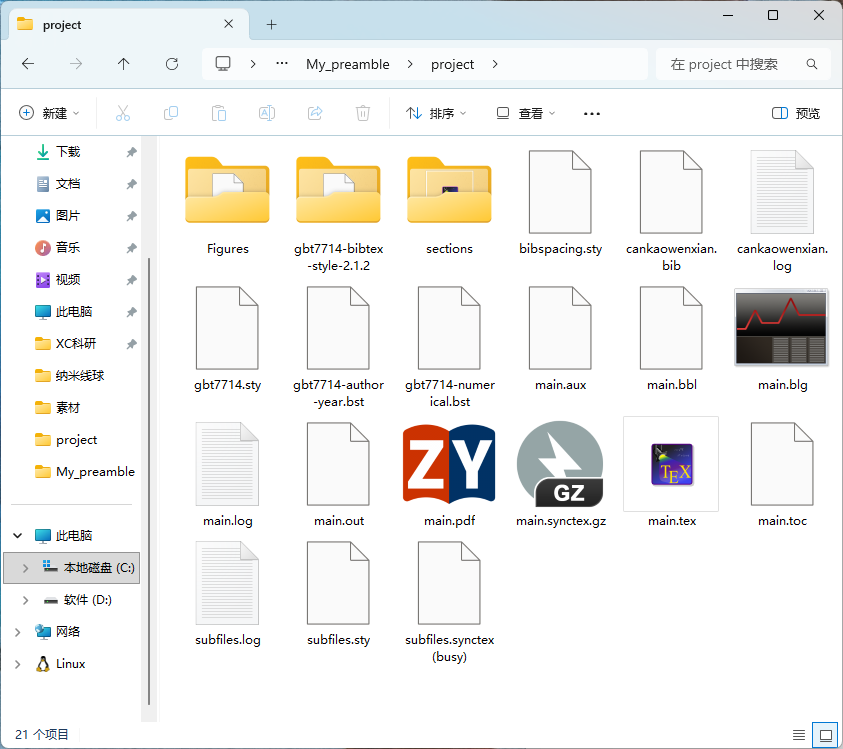
The obtained file
Code path confirmation
After obtaining the compressed file, extract it to the default location. My_preamble In the folder, then drag the folder directly to...C drivethe following.
Note: You can also drag it to other drives, but please make sure it is on the correct drive.
main.tex和My_preamble.styAdjust code
After ensuring that TeX Live + TeXstudio are installed, open it. C:\My_preamble\project Under the path main.tex 和C:\My_preamble Under the path My_preamble.sty Modify the following code path.
Path 1:
main.texChinese: \usepackage{C:/My_preamble/My_preamble}Path 2:
My_preamble.styChinese: \graphicspath{{C:/My_preamble/project/Figures/}{logo/}}
Code path 1 is My_preamble.sty The file path is specified, and code path 2 is the image path. Ensure that both code paths match the actual file paths. If they do not match, you need to change the code in both locations to the actual file paths. Therefore, it is recommended to place them directly on the C drive.
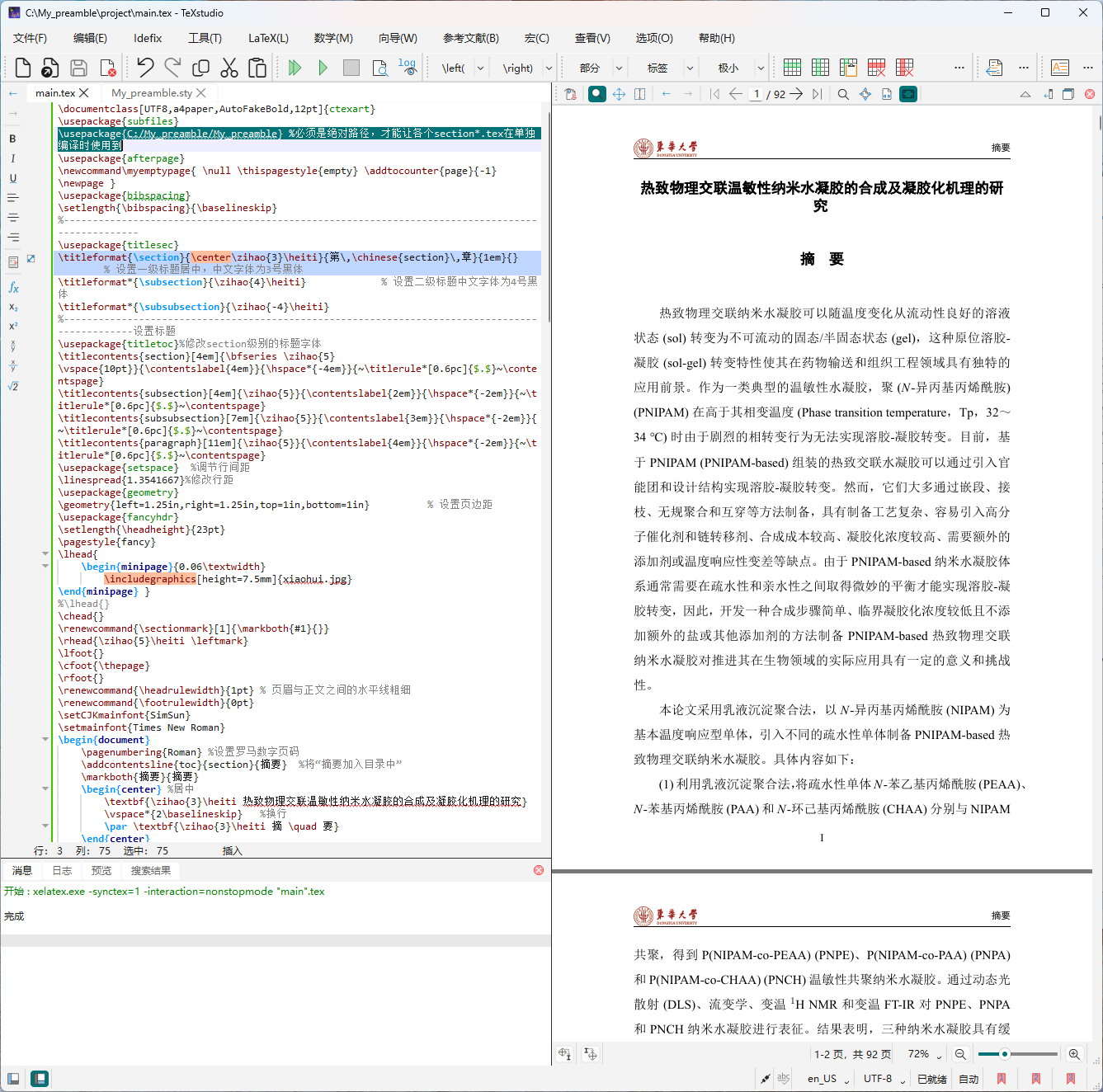
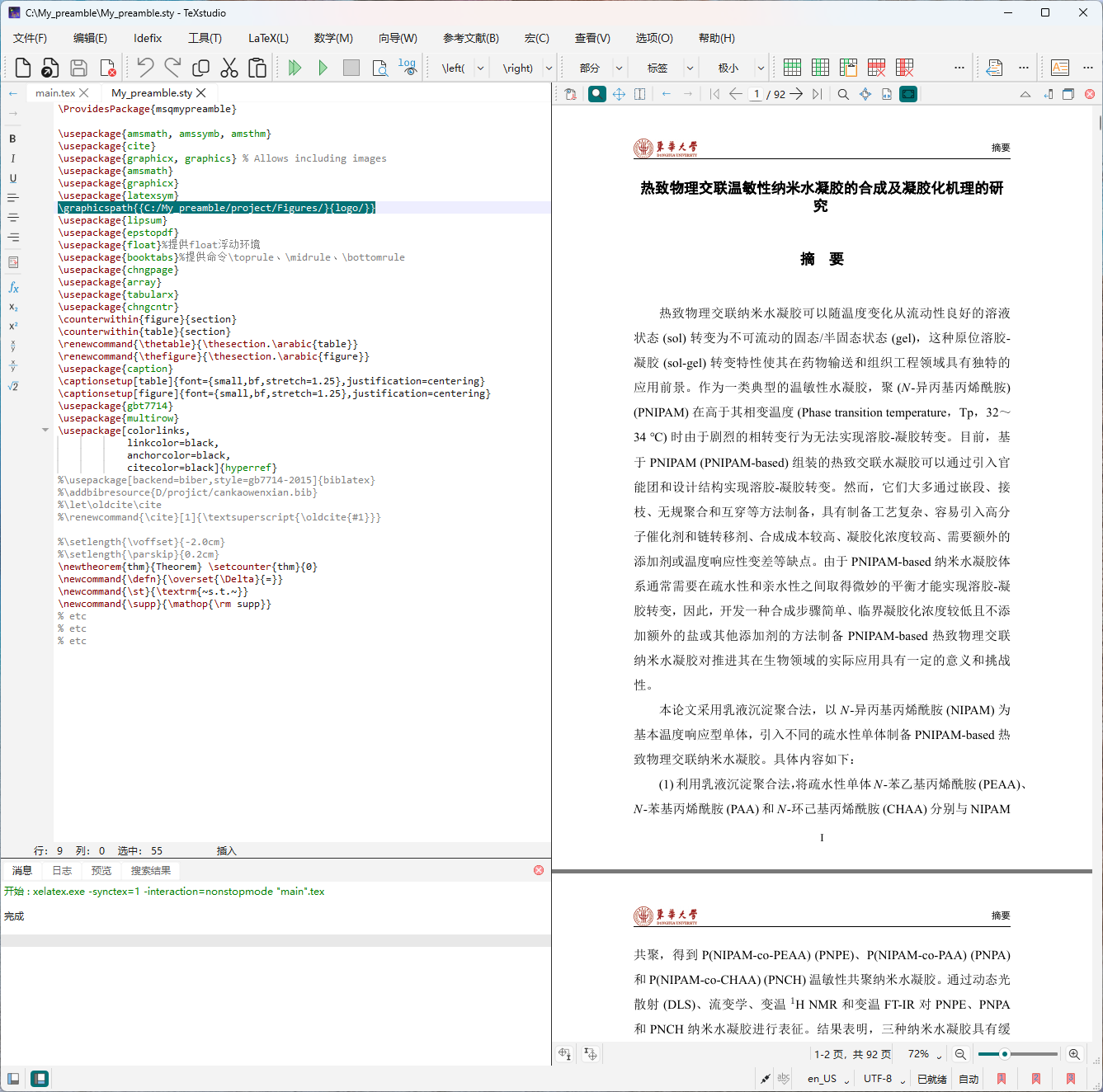
After confirming that the code and file path are consistent, you can compile and run it directly. main.tex Wait for the formatted article to finish. If you encounter compilation errors, you can...Submit an issueCommunication and discussion.
If the compilation is successful, you can use this template to write and format your own paper using basic LaTeX syntax.
Detailed usage instructions
This template uses a single main file; adding a new chapter involves adding a `\subfile{sections/sectionX}` structure. The preamble section is centrally managed and formatted uniformly. It is suitable for master's and doctoral students with some LaTeX basics who want to focus their efforts on content creation.
- The template's formatting and layout are already done; you only need to adjust the text content.
- Using this template requires a basic understanding of LaTeX syntax; please refer to the following tutorials.
- The images used in this article are stored in
C:/My_preamble/project/Figures/Below, place the images you want to insert in the article in this location, and then reference them in the article. - When writing in chapters, you only need to...
sectionsThe corresponding chapter below.texThe file is sufficient. - For basic LaTeX syntax, please refer to [link/reference]. LaTeX Quick Reference和Introduction document
Understanding the basic structure of LaTeX documents
The following examples are available for download to view the code syntax and compilation/formatting.
You need to log in to view the full content
Already logged in?Refresh immediately
LaTeX documents typically consist of an introduction section and a body section.
A very simple LaTeX document is as follows:
\documentclass{article} \begin{document} Hello, LaTeX! \end{document}in:
\documentclass{article}: Specifies the document type.\begin{document}: Indicates the start of the main text.\end{document}: This indicates the end of the main text.
\documentclass Determine the basic structure and formatting rules used in the document.
Common document types include:
| Document types | Applicable scenarios |
|---|---|
| article | Journal articles, short technical reports |
| report | Dissertation, longer report |
| book | Academic books and monographs |
| beamer | Academic presentation |
When actually submitting a manuscript, many journals and conferences provide dedicated [tools/tools]. .cls For class files, the official template should be used first, rather than choosing a generic document type yourself.
Set the paper title, authors, and abstract.
Scientific papers typically include a title, authors, abstract, and keywords.
The following code can be used:
\documentclass[12pt,a4paper]{article} \title{Research on Scientific Data Analysis} \author{ Author Name\\ Department of Research\\ University Name } \date{\today} \begin{document} \maketitle \begin{abstract} This paper introduces a research method for scientific data analysis. \end{abstract} \noindent\textbf{Keywords:} Scientific Research, Data Analysis, LaTeX \end{document}Main command descriptions:
\title{}Define the paper title.\author{}Define author information.\date{}Set the date.\maketitleGenerate title area.abstractAbstract environment.
Abstract and keyword formats may vary between journals; please refer to the template of the target journal when submitting your manuscript.
Organizing the chapters of the paper
LaTeX supports multi-level chapter structures.
Common commands include:
\section{Introduction} \subsection{Research Background} \subsubsection{Research Objectives} \section{Materials and Methods} \section{Results} \section{Discussion} \section{Conclusion}For use article For document-based papers, the following methods can typically be used:
\section{}Chapter 1.\subsection{}: Second-level chapter.\subsubsection{}Level 3 chapter.
If using report 或 bookIt can also be used \chapter{}。
Automatically generate table of contents
For dissertations, technical reports, and longer research documents, the following can be used:
\tableofcontentsIf you need to generate a table of figures and tables, you can also use:
\listoffigures \listoftablesThis content typically requires multiple rounds of compilation to be fully updated.
Mathematical formula typesetting
Mathematical formulas are one of LaTeX's key strengths. LaTeX can handle complex expressions relatively easily in fields such as mathematics, physics, engineering, computer science, and quantitative life sciences.
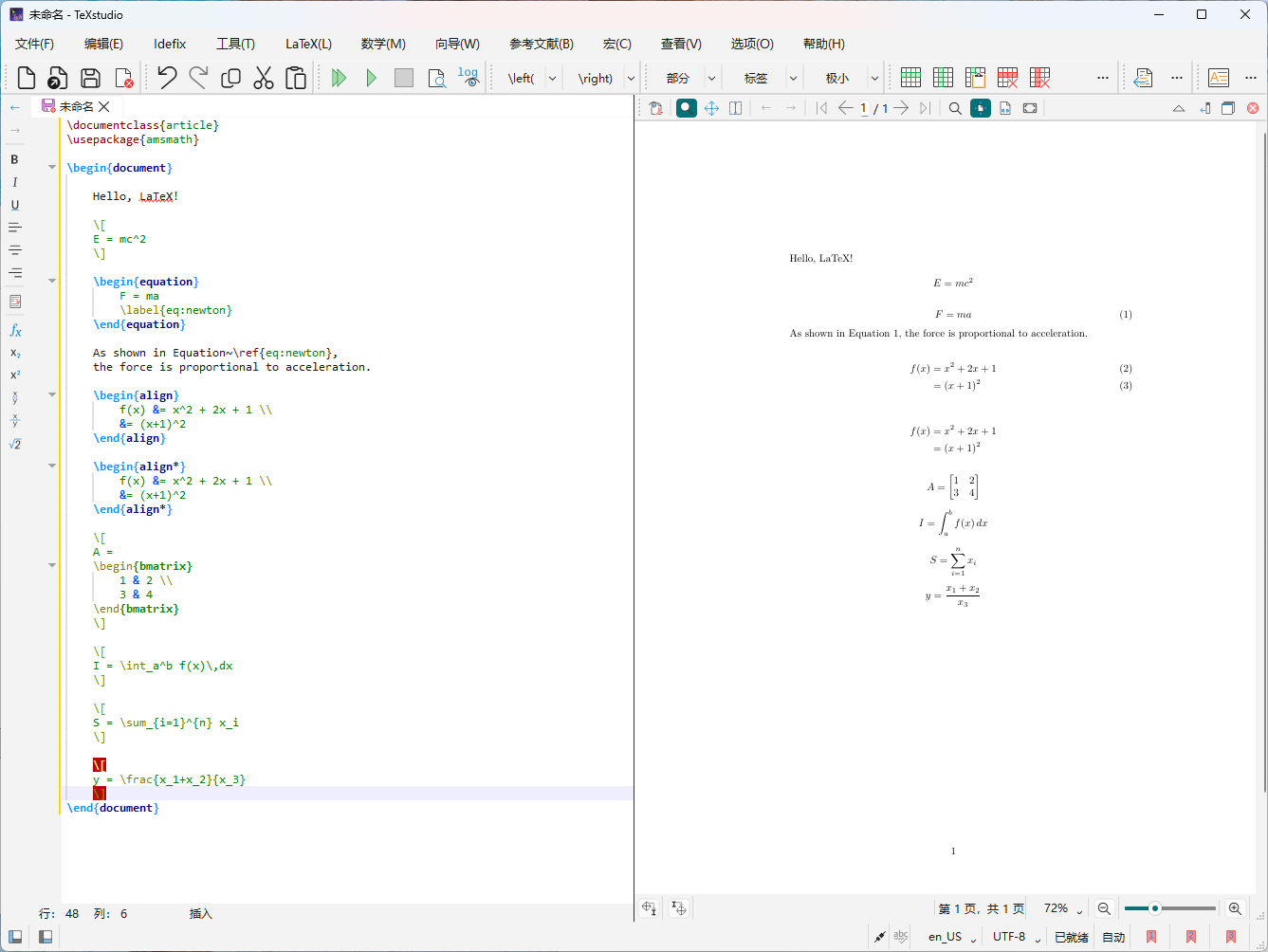
inline formula
If the formula is short, it can be placed directly in the main text.
For example:
The relationship between force and mass is expressed as $F = ma$.Effect:
The relationship between force and mass is expressed as (F=ma).
Inline formulas are suitable for variables, simple expressions, and short formulas.
Independent formulas
For mathematical expressions that need to be displayed separately, you can use:
[E = mc^2]This method is suitable for independent formulas that do not require numbering.
Numbered formulas
Formulas are frequently used in scientific research papers, therefore it is recommended to use... equation environment:
\begin{equation} F = ma \label{eq:newton} \end{equation}in:
equationCreate numbered formulas.\label{}Set formula labels for easy reference later.
Quoted in the main text:
As shown in Equation~\ref{eq:newton}, the force is proportional to acceleration.LaTeX will automatically generate the corresponding formula numbers.
Multi-line formula alignment
For more complex mathematical derivations, you can use align environment.
First, load the preamble:
\usepackage{amsmath}Then write:
\begin{align} f(x) &= x^2 + 2x + 1 \\ &= (x+1)^2 \end{align}in & Indicates the alignment position.\\ This indicates a newline.
If numbering is not required, you can use:
\begin{align*} f(x) &= x^2 + 2x + 1 \\ &= (x+1)^2 \end{align*}Matrices and complex expressions
LaTeX also supports matrices, integrals, summations, fractions, and subscripts and superscripts.
Matrix example:
\[ A = \begin{bmatrix} 1 & 2 \\ 3 & 4 \end{bmatrix} \]Integral example:
[I = \int_a^bf(x)\,dx\]Example of summation:
[S = \sum_{i=1}^{n} x_i\]Fraction example:
\[ y = \frac{x_1+x_2}{x_3} \]For papers that require handling a large number of mathematical expressions, it is recommended to familiarize yourself with... amsmath The package provides commonly used formula environments and mathematical typesetting functions.
Insert images and scientific charts
Scientific papers typically include experimental result figures, flowcharts, microscopic images, statistical graphs, and model diagrams. LaTeX can be used to... graphicx This package inserts external images.
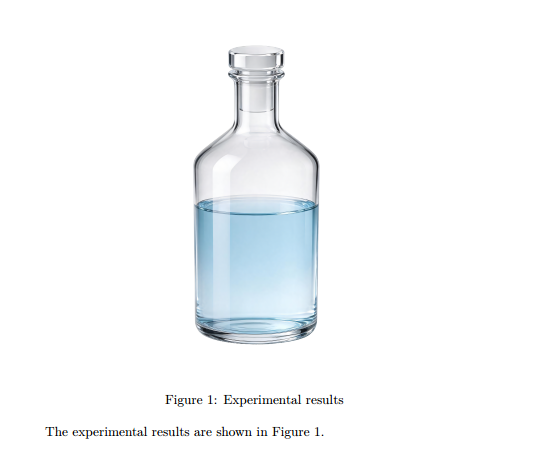
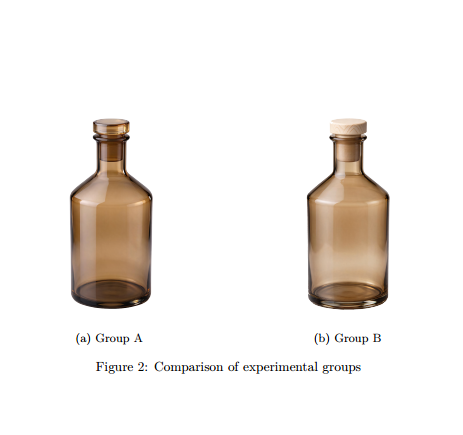
Image loading macro package
Add the following to the preamble:
\usepackage{graphicx}You can then insert images into the main text.
Insert an image
Suppose there is a file named in the project directory. experiment.png The images can be used as follows:
\begin{figure}[htbp] \centering \includegraphics[width=0.8\textwidth] {experiment.png} \caption{Experimental results} \label{fig:experiment} \end{figure}Main parameter descriptions:
figureCreate a floating image.\centeringImage centered.width=0.8\textwidthImage width is 80% of the text width.\caption{}Add image title.\label{}Set image reference tags.
Image references in the main text
It can be written like this:
The experimental results are shown in Figure~\ref{fig:experiment}.The image numbers will be automatically updated according to the order in the document.
Insert side by side images
Sometimes it is necessary to compare the results of different experimental groups or under different treatment conditions.
It can be used subcaption Macro packages:
\usepackage{graphicx} \usepackage{subcaption}Example:
\begin{figure}[htbp] \centering \begin{subfigure}{0.48\textwidth} \centering \includegraphics[width=\linewidth]{group_a.png} \caption{Group A} \end{subfigure} \hfill \begin{subfigure}{0.48\textwidth} \centering \includegraphics[width=\linewidth]{group_b.png} \caption{Group B} \end{subfigure} \caption{Comparison of experimental groups} \label{fig:comparison} \end{figure}This method is suitable for displaying control results of different experimental groups, different time points, or different models.
Format and resolution of scientific images
Image quality directly affects the final reading experience of a paper.
Common formats and uses:
| Image format | Common uses |
|---|---|
| Vector graphics, flowcharts, and images exported from drawing software | |
| PNG | Schematic diagram, screenshot, lossless bitmap |
| JPG/JPEG | Photos and some experimental images |
| EPS | Vector graphics in some traditional LaTeX workflows |
Scientific graphs should be drawn in vector format whenever possible, especially statistical graphs with many axes, text, and lines.
For bitmaps of microscopic images and experimental photographs, the resolution, color mode, and image size should be checked according to the journal's requirements. Do not simply increase the actual resolution by enlarging the image.
Additionally, attention needs to be paid to image width in two-column papers. Single-column images typically use... \columnwidthImages spanning two columns can be used. figure* environment.
Creating research forms
Experimental data, statistical results, and model performance comparisons are typically presented in tables.
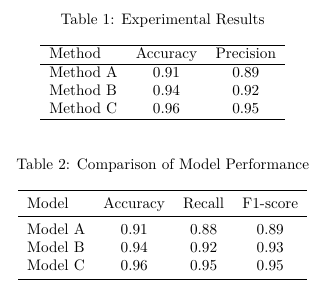
LaTeX usage tabular Environment creation form.
Create a basic table
\begin{table}[htbp] \centering \caption{Experimental Results} \label{tab:results} \begin{tabular}{lcc} \hline Method & Accuracy & Precision \\ \hline Method A & 0.91 & 0.89 \\ Method B & 0.94 & 0.92 \\ Method C & 0.96 & 0.95 \\ \hline \end{tabular} \end{table}in:
lLeft-aligned.cCenter alignment.rRight-aligned.&: Separator column.\\: End the current line.hlineAdd a horizontal line.
Use booktabs to create standardized tables
Three-line tables, commonly used in academic papers, can be used to... booktabs Implemented using macro packages.
Introduction Section:
\usepackage{booktabs}Table example:
\begin{table}[htbp] \centering \caption{Comparison of Model Performance} \label{tab:model} \begin{tabular}{lccc} \toprule Model & Accuracy & Recall & F1-score \\ \midrule Model A & 0.91 & 0.88 & 0.89 \\ Model B & 0.94 & 0.92 & 0.93 \\ Model C & 0.96 & 0.95 & 0.95 \\ \bottomrule \end{tabular} \end{table}Three-line tables are mainly used for:
\toprule: Top line of the table.\midruleThe line between the table header and the body text.\bottomrule: Table bottom line.
Compared to tables that heavily use vertical lines, three-line tables are generally simpler and more in line with the layout conventions of many academic publications. However, the formatting requirements of the target journal or conference should still be followed.
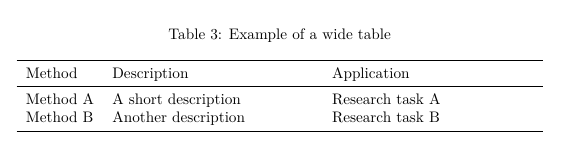
Solving the problem of tables being too wide
When a table has a large number of columns, it may exceed the page width.
The following methods can be considered:
- Shorten column headers appropriately.
- Use
p{}Set column width. - Use
tabularxAutomatically adjust column width. - Use landscape orientation for wide tables.
- Use a cross-column table environment for two-column papers.
For example:
\usepackage{tabularx} \begin{table}[htbp] \centering \caption{Example of a wide table} \begin{tabularx}{\textwidth}{lXX} \toprule Method & Description & Application \\ \midrule Method A & A short description & Research task A \\ Method B & Another description & Research task B \\ \bottomrule \end{tabularx} \end{table}Don't shrink the font size excessively to fit tables onto the page. Prioritize adjusting the structure and column widths to ensure the data is easy to read.
Reference management: BibTeX
Scientific research papers typically require citing numerous references. Manually adjusting the references at the end of the paper with each revision is not only labor-intensive but also prone to inconsistencies in numbering, authorship, and formatting.

LaTeX can manage references through BibTeX.
Creating a BibTeX Literature Database
First, create a file in the project directory:
references.bib
Then save the literature information in BibTeX format.
For example:
@article{smith2024research, author = {Smith, John and Brown, Alice}, title = {An Example of Scientific Research}, journal = {Journal of Research}, year = {2024}, volume = {12}, number = {3}, pages = {100--110}, doi = {10.1234/example} }in:
@article: indicates a journal article.smith2024researchReference key.author:author.title: Paper title.journalJournal name.yearPublication year.volumeVolume number.numberIssue number.pages:page number.doi: Identifier for a numeric object.
The specific fields for each document entry should be filled in according to the document type. Books, conference papers, dissertations, and web resources typically use different entry types.
Citing references in the main text
If using traditional BibTeX, you can write the following in the body of the text:
Previous studies have discussed this problem \cite{smith2024research}.Multiple documents can be written as:
\cite{smith2024research,other2023study}Generate a list of references
Add the following to the end of the document:
\bibliographystyle{plain} \bibliography{references}in:
plainChoose a traditional reference style.references: Specify the filename of the literature database; no need to specify..bibFile extension.
When submitting a manuscript, you should use the reference template provided by the target journal and not the default one. plain It meets the requirements of all journals.
Cross-referencing:
Make charts, formulas and chapter numbers update automatically
Scientific papers often require citing a picture, a formula, or a chapter in the main text.
If manual numbering is used, each citation needs to be checked individually when the content of the paper changes.
LaTeX \label{} 和 \ref{} This problem can be solved.
For example, defining a chapter:
\section{Materials and Methods} \label{sec:methods}Quoted in the main text:
The experimental procedure is described in Section~\ref{sec:methods}.Define image:
\begin{figure}[htbp] \centering \includegraphics[width=0.8\textwidth]{experiment.png} \caption{Experimental results} \label{fig:results} \end{figure}Image reference:
The results are shown in Figure~\ref{fig:results}.Formula reference:
\begin{equation} E = mc^2 \label{eq:energy} \end{equation}Main text quotation:
Equation~\ref{eq:energy} describes the relationship between mass and energy.If you want the names of figures, tables, formulas, etc., to be automatically displayed when referenced, you can consider using... cleveref Macro packages are available, but it's necessary to check if the target template is compatible.
An important habit is:将 \label{} Place it after the corresponding title, caption, or formula number command. For images and tables, they are usually placed in \caption{} Then, in order to obtain the correct number.
Use the LaTeX templates provided by journals and conferences.
For formal submissions, it is generally not recommended to manually design the format of the entire paper starting from a blank document.
Most journals or academic conferences provide official templates, which may include:
- Document files
.cls - macro package file
.sty - Reference style
.bst - Template main file
.tex - Example images and references
- Compilation Instructions and Submission Guidelines
Where can I get paper templates?
We recommend prioritizing the use of the following official entry points:
Overleaf Template Library
https://www.overleaf.com/latex/templates
You can search for templates by journal name, conference name, or paper type.
IEEE official author resources
This is suitable for authors preparing submissions to IEEE journals or conferences. Templates and author guidelines can be found on the corresponding publication pages.
ACM official publication resources
https://www.acm.org/publications/authors
This template is applicable to ACM-related publications. Specific templates and submission requirements should be found on the corresponding conference or journal pages.
Basic steps for using templates
- Visit the official website of the target journal or conference.
- Find the Author Guidelines or Submission Guidelines.
- Download the official LaTeX template.
- Unzip the template file.
- Read the README or instructions in the template.
- Use the template provided by the main
.texThe document writing begins. - Configure the compilation engine and reference tools as required.
- Compile the PDF and check its format and content.
- Submit the source file and PDF according to the submission system requirements.
Do not modify the key parameters of the journal template without authorization in pursuit of a more aesthetically pleasing layout. Font, margins, column width, title format, and reference format may be part of publishing standards.
Complete example:
Create a compileable research paper
The preceding sections introduced the paper's title, chapters, formulas, figures, tables, and references. Now, we'll combine these elements to construct a simplified paper project.
Create a project directory
It is recommended to create the following directory first:
Research_Paper/ │ ├── main.tex ├── references.bib │ └── figures/ ├── experiment.png └── workflow.pngin:
main.tex: The main file of the paper.references.bibReference database.figures/Image directory.
Writing the main file of the paper
Save the following content as main.tex:
\documentclass[12pt,a4paper]{article} % Page and typesetting\usepackage[margin=2.5cm]{geometry} \usepackage{setspace} \usepackage{graphicx} \usepackage{booktabs} \usepackage{amsmath} \usepackage{hyperref} % Line spacing\onehalfspacing % Hyperlinks\hypersetup{ colorlinks=true, linkcolor=blue, citecolor=blue, urlcolor=blue } % Title information\title{An Example of Scientific Research} \author{Author Name} \date{\today} \begin{document} \maketitle % Abstract\begin{abstract} This paper presents a simple example of a scientific research document written using LaTeX. \end{abstract} \noindent\textbf{Keywords:} Scientific Research, Data Analysis, LaTeX % Introduction\section{Introduction} LaTeX is widely used for preparing scientific and technical documents. % Research Methods\section{Materials and Methods} The mathematical relationship can be expressed as: \begin{equation} y = ax + b \label{eq:linear} \end{equation} As shown in Equation~\ref{eq:linear}, the model describes a linear relationship. % Picture\section{Experimental Results} Figure~\ref{fig:experiment} shows an example of experimental data. \begin{figure}[htbp] \centering \includegraphics[width=0.7\textwidth] {figures/experiment.png} \caption{An example of experimental results.} \label{fig:experiment} \end{figure} % Table~\ref{tab:results} summarizes the experimental results. \begin{table}[htbp] \centering \caption{Example of experimental results} \label{tab:results} \begin{tabular}{lcc} \toprule Method & Accuracy & Precision \\ \midrule Method A & 0.91 & 0.89 \\ Method B & 0.94 & 0.92 \\ Method C & 0.96 & 0.95 \\ \bottomrule \end{tabular} \end{table} % Discussion\section{Discussion} The results demonstrate the potential of the proposed method. % Conclusion\section{Conclusion} This example demonstrates the basic structure of a LaTeX paper. % References\bibliographystyle{plain} \bibliography{references} \end{document}Writing reference files
在 references.bib Add:
@article{smith2024research, author = {Smith, John and Brown, Alice}, title = {An Example of Scientific Research}, journal = {Journal of Research}, year = {2024}, volume = {12}, number = {3}, pages = {100--110} }Then add a citation in the main text of the paper:
Previous research has discussed similar methods \cite{smith2024research}.It is important to note that the references listed here are for demonstration purposes only and do not represent actual research findings. Formal papers should be replaced with verified, authentic reference entries.
Compiled Papers
If you are using Overleaf, click Recompile to generate a PDF.
If using local TeX Live and traditional BibTeX workflows, you can execute them in the following order within the project directory:
xelatex main.tex bibtex main xelatex main.tex xelatex main.texIf the template uses pdfLaTeX, it should be... xelatex Replace with pdflatexIf using BibLaTeX, it is usually necessary to run... biber mainThe specific compilation process should follow the template instructions.
After compilation, a PDF file and auxiliary files will be generated in the project directory.
Common Problems and Troubleshooting Methods for LaTeX Beginners
It's quite normal to encounter compilation errors when you first start using LaTeX. Instead of repeatedly modifying the code, it's better to learn how to identify error messages first.
Undefined control sequence
Common causes:
- The command is misspelled.
- A macro package that has not yet been loaded was used.
- The current template does not support some commands.
Solution:
- Check the commands near the line that reported the error.
- Confirm that the relevant macro packages have been loaded.
- Check if the command is spelled correctly.
- Check if the target template supports this command.
File not found
Common causes:
- The image file does not exist.
- The file path was entered incorrectly.
- The filenames are case-insensitive.
- The image was not uploaded to the project directory.
Solution:
Check the actual location of the image, for example:
figures/experiment.pngThe corresponding LaTeX command should be written as:
\includegraphics{figures/experiment.png}Missing $ inserted
Common causes:
The mathematical command was written in a plain text environment, or the start and end symbols of the mathematical pattern do not match.
For example:
The result is alpha + beta.Errors may occur.
Correct way to write:
The result is $\alpha + \beta$.References are displayed as question marks
Common causes:
- Reference keys and
.bibThe entries in the file are inconsistent. - The literature database file was not loaded correctly.
- BibTeX or Biber was not running during the compilation process.
- The necessary multi-round compilation has not yet been completed.
Solution:
- examine
\cite{}Reference keys in the text. - examine
.bibFile name and path. - Confirm the reference system used.
- Recompile according to the corresponding workflow.
Chinese characters cannot be displayed correctly.
Common causes:
- The compilation engine does not support the current Chinese configuration.
- The Chinese font or related package is missing.
- Document class and font configuration are incompatible.
If you need to write Chinese documents, you can use ctex Document classes, for example:
\documentclass[UTF8]{ctexart} \begin{document} Chinese LaTeX Example. \section{Research Background} This is a Chinese section. \end{document}It is recommended to use XeLaTeX to compile these Chinese examples.
If you are submitting to an English journal, do not directly copy the Chinese document configuration into the journal template just because the local Chinese test was successful.
Practical tips for improving LaTeX scientific writing efficiency
After mastering the basic commands, you can also improve the efficiency of paper writing by standardizing the project structure and workflow.
Break long papers down into multiple files
When a paper is long, it is not recommended to put all the content into one volume. .tex In the file.
It can be organized by chapter:
Research_Paper/ │ ├── main.tex ├── sections/ │ ├── introduction.tex │ ├── methods.tex │ ├── results.tex │ └── discussion.tex │ ├── figures/ ├── references.bib └── tables/Use it in the main file:
\input{sections/introduction} \input{sections/methods} \input{sections/results} \input{sections/discussion}This allows for separate editing of different chapters, reducing the difficulty of maintaining large files.
Managing documents using Zotero
If you regularly need to read a large number of research papers, you might consider using Zotero to manage your literature.
Zotero official website:
Zotero can help users:
- Collect and organize information from academic papers and literature.
- Manage PDF attachments.
- Add tags and notes.
- Search for literature.
- Generate data in BibTeX or other reference formats.
For LaTeX users, the documents organized in Zotero can be exported as... .bib The file can then be used in the paper.
It is important to note that exported bibliographic entries still need to be checked for fields such as author, title, journal, volume and issue, page number, and DOI to avoid metadata errors being transmitted to the final paper.
Using Git to manage paper source files
For long-term research projects, it is recommended to consider using Git to save the modification history of LaTeX source files.
It can help authors:
- Compare the content of different versions of the paper.
- Revert to the previous changes.
- Manage different submission versions.
- Share source files with collaborators.
- Avoid confusion caused by multiple copies of files.
It's important to note that PDFs, temporary compiled files, and large amounts of raw experimental data from research projects may not all be suitable for direct inclusion in Git. You can tailor your approach based on the specific project requirements. .gitignoreIt only tracks files that truly require version control.
Separate the paper content from the formatting settings.
In long-term writing, it is advisable to avoid repeating the same font, heading format, and image width in each chapter.
You can put frequently used settings in the preamble or organize them into your own macros.
For example:
\newcommand{\R}{\mathbb{R}} \newcommand{\dif}{\mathrm{d}}This allows it to be reused within the main text:
\[ x \in \R \]For projects that require changing journal templates, try to keep the main text content independent and reduce manual formatting settings that are tied to a specific layout.
LaTeX learning resources and official documentation
If you wish to further master LaTeX, it is recommended to prioritize reading the official documentation and long-maintained learning materials.
| resource | Main uses | Official entrance |
|---|---|---|
| LaTeX Project | LaTeX Official Documentation and Basic Resources | https://www.latex-project.org/ |
| Overleaf Learn | Tutorial from beginner to formulas, charts, and references | https://www.overleaf.com/learn |
| Overleaf Templates | Paper, journal and conference templates | https://www.overleaf.com/latex/templates |
| CTAN | Querying and downloading LaTeX packages | https://ctan.org/ |
| TeX Live | Local LaTeX distribution | https://www.tug.org/texlive/ |
| Zotero | Scientific literature management | https://www.zotero.org/ |
Overleaf's learning materials cover basic syntax, mathematical formulas, images, tables, document structure, and reference management; CTAN is suitable for searching package functions and usage instructions.
Conclusion
LaTeX is not simply a replacement for a text editor with code; rather, it integrates the organization of paper content, mathematical expression, chart management, and layout control into a structured writing process.
For researchers who frequently need to work with formulas, charts, references, and complex chapter structures, mastering LaTeX can reduce a lot of repetitive typesetting work and also help to create more standardized and maintainable paper source files.
Beginners don't need to learn all the packages and complex commands right away. They can start by creating a simple paper using Overleaf to gradually master the basics of titles, abstracts, chapters, formulas, figures, and references; then they can try local environments, multi-file projects, and journal templates.
When submitting a formal manuscript, it is still most important to follow the official requirements of the target journal or conference. Using LaTeX appropriately allows authors to focus more on the research content, data analysis, and academic expression, rather than repeatedly adjusting the formatting.
Reference Links
- LaTeX Project official website:https://www.latex-project.org/
- LaTeX Official Documentation:https://www.latex-project.org/help/documentation/
- Overleaf LaTeX Learning Center:https://www.overleaf.com/learn
- Overleaf LaTeX Basic Tutorial:https://www.overleaf.com/learn/latex/Free_online_introduction_to_LaTeX_%28part_1%29
- Overleaf Structured Document Tutorial:https://www.overleaf.com/learn/latex/Free_online_introduction_to_LaTeX_%28part_2%29
- Overleaf LaTeX Template Library:https://www.overleaf.com/latex/templates
- CTAN Package Repository:https://ctan.org/
- BibLaTeX package description:https://ctan.org/pkg/biblatex
- TeX Live Official Website:https://www.tug.org/texlive/
- Zotero official website:https://www.zotero.org/